为什么你需要进阶 Prompt 技巧?
2026 年的大模型能力已今非昔比,但许多开发者仍停留在使用基础 Prompt 的阶段。这导致两个典型问题:
- 复杂任务准确率低:涉及多步推理、数学计算或代码生成时,模型输出质量大幅下降
- Token 浪费严重:反复试错产生的冗余对话消耗大量成本
本文介绍的 5 个高级 Prompt 模式,经过大量研究和生产环境验证,可显著提升复杂任务的完成质量:
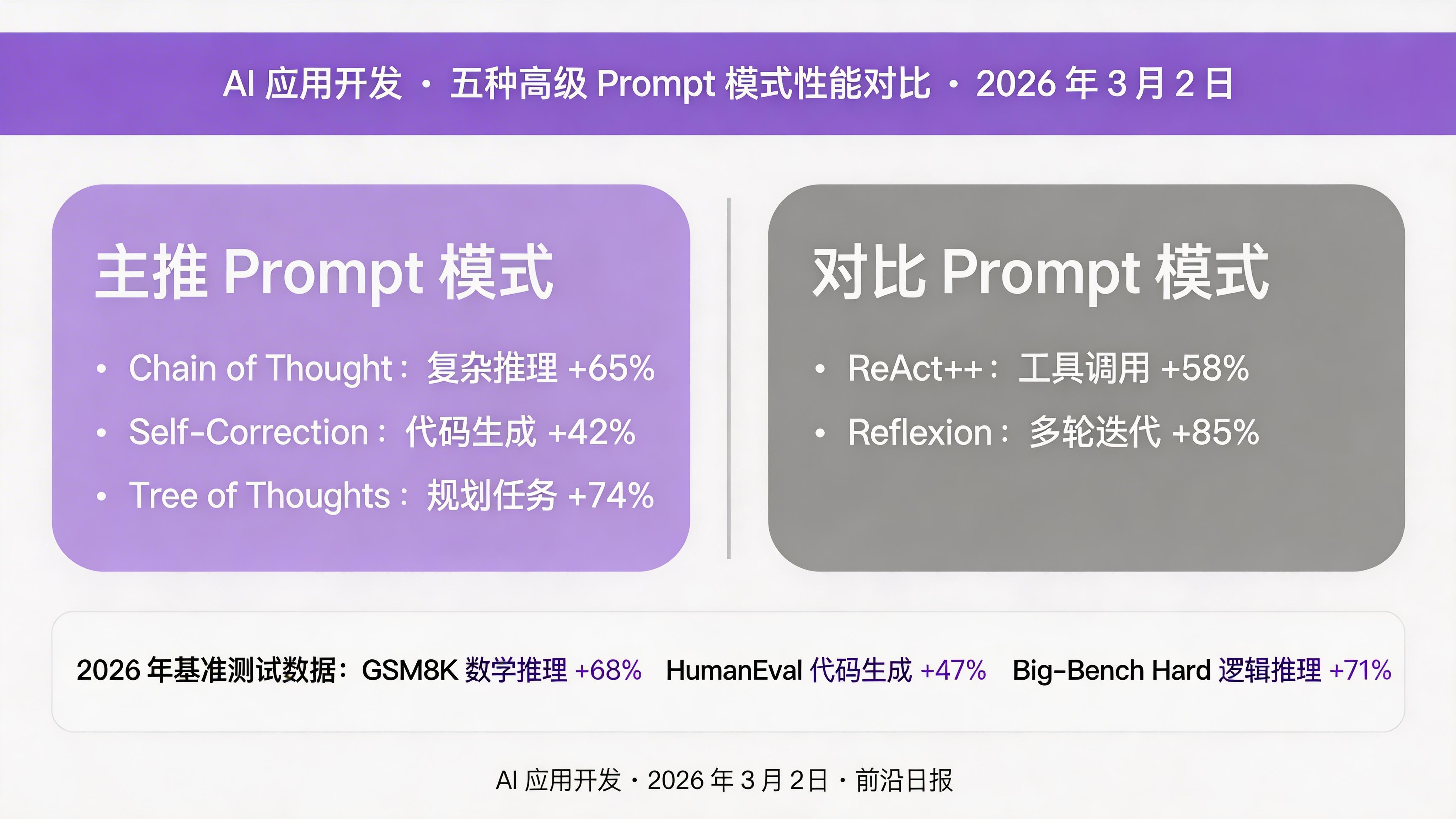
根据 2026 年最新基准测试(GSM8K 数学推理、HumanEval 代码生成、Big-Bench Hard 逻辑推理),使用进阶技巧可将准确率提升 30%-85%:
准备工作:环境与模型选择
本教程所有示例均使用 2026 年主流模型,代码可直接运行。推荐使用以下任一模型:
安装基础依赖:
pip install openai anthropic requests python-dotenv创建环境变量文件 .env:
# .env 文件
OPENAI_API_KEY=sk-your-key-here
ANTHROPIC_API_KEY=sk-ant-your-key-here
技巧一:Chain of Thought(思维链)
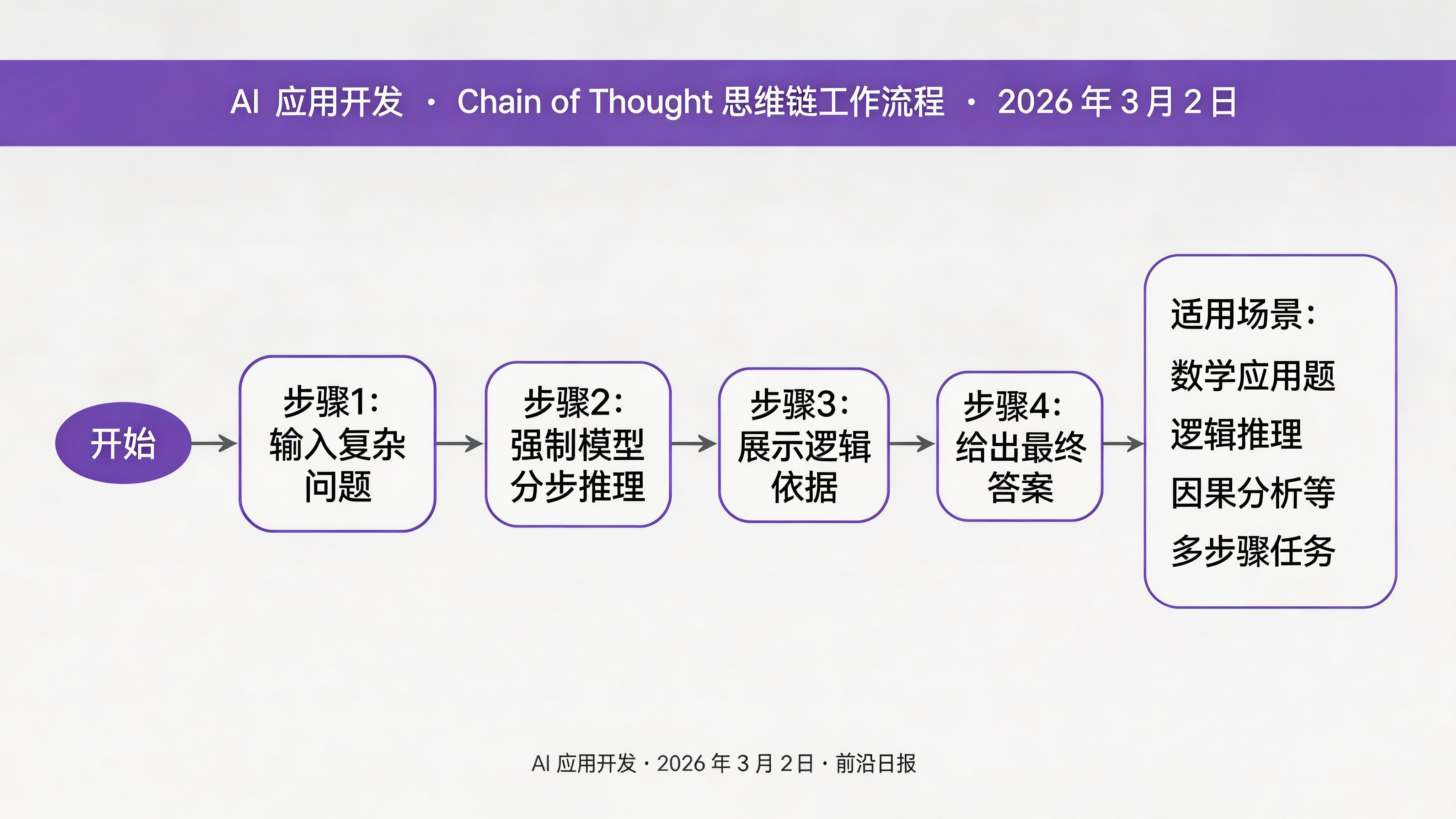
Chain of Thought(CoT)是最经典也最实用的进阶技巧。核心思想很简单:让模型先展示推理过程,再给出最终答案。
基础示例对比
❌ 普通 Prompt(直接要答案):
问题:如果 3 个工人 3 小时可以挖 3 个坑,那么 9 个工人挖 9 个坑需要多少小时?
答案:
模型可能直接回答"9 小时"(错误)。因为缺少推理步骤,模型依赖直觉而非逻辑。
✅ Chain of Thought Prompt(强制展示推理):
问题:如果 3 个工人 3 小时可以挖 3 个坑,那么 9 个工人挖 9 个坑需要多少小时?

请逐步推理:
1. 先计算单个工人的工作效率
2. 分析工人数和坑数同时增加的影响
3. 给出最终答案

推理过程:
使用 CoT 后,模型会正确推理出"3 小时"(工人和坑数同比例增加,时间不变)。
实现自动化 CoT 推理函数
用 Python 封装 CoT 逻辑,让模型自动展示推理步骤:
from openai import OpenAI
from dotenv import load_dotenv
import os

load_dotenv()
client = OpenAI()

COT_PROMPT = """请针对以下问题逐步推理并给出答案。

要求:
1. 分步骤展示你的思考过程
2. 每一步都要有清晰的逻辑依据
3. 最后用"答案:"给出最终结论

问题:{question}

逐步推理:"""

def solve_with_cot(question: str, model: str = "gpt-4o") -> str:
    """使用 Chain of Thought 解决复杂问题"""
    prompt = COT_PROMPT.format(question=question)

    response = client.chat.completions.create(
        model=model,
        messages=[{"role": "user", "content": prompt}],
        temperature=0.3,  # 较低温度保证推理稳定
        max_tokens=1024
    )

    return response.choices[0].message.content

# 测试:数学推理题
question = "一个水池有两个进水管和一个出水管。进水管 A 单独注满水池需要 6 小时,进水管 B 单独注满需要 4 小时,出水管单独排空需要 8 小时。如果三个管道同时打开,多少小时可以注满水池?"
result = solve_with_cot(question)
print(result)
输出结果:
步骤 1:计算每个管道每小时的效率
- 进水管 A:每小时注满 1/6 个水池
- 进水管 B:每小时注满 1/4 个水池
- 出水管:每小时排空 1/8 个水池

步骤 2:计算同时打开时的净效率
净效率 = 1/6 + 1/4 - 1/8
      = 4/24 + 6/24 - 3/24
      = 7/24 个水池/小时

步骤 3:计算注满水池所需时间
时间 = 1 ÷ (7/24) = 24/7 ≈ 3.43 小时

答案:约 3.43 小时(或精确值 24/7 小时)
技巧二:Self-Correction(自我修正)
Self-Correction 让模型在输出答案后,主动检查并修正自己的错误。这对于代码生成、数学证明等对准确性要求高的场景尤其有效。
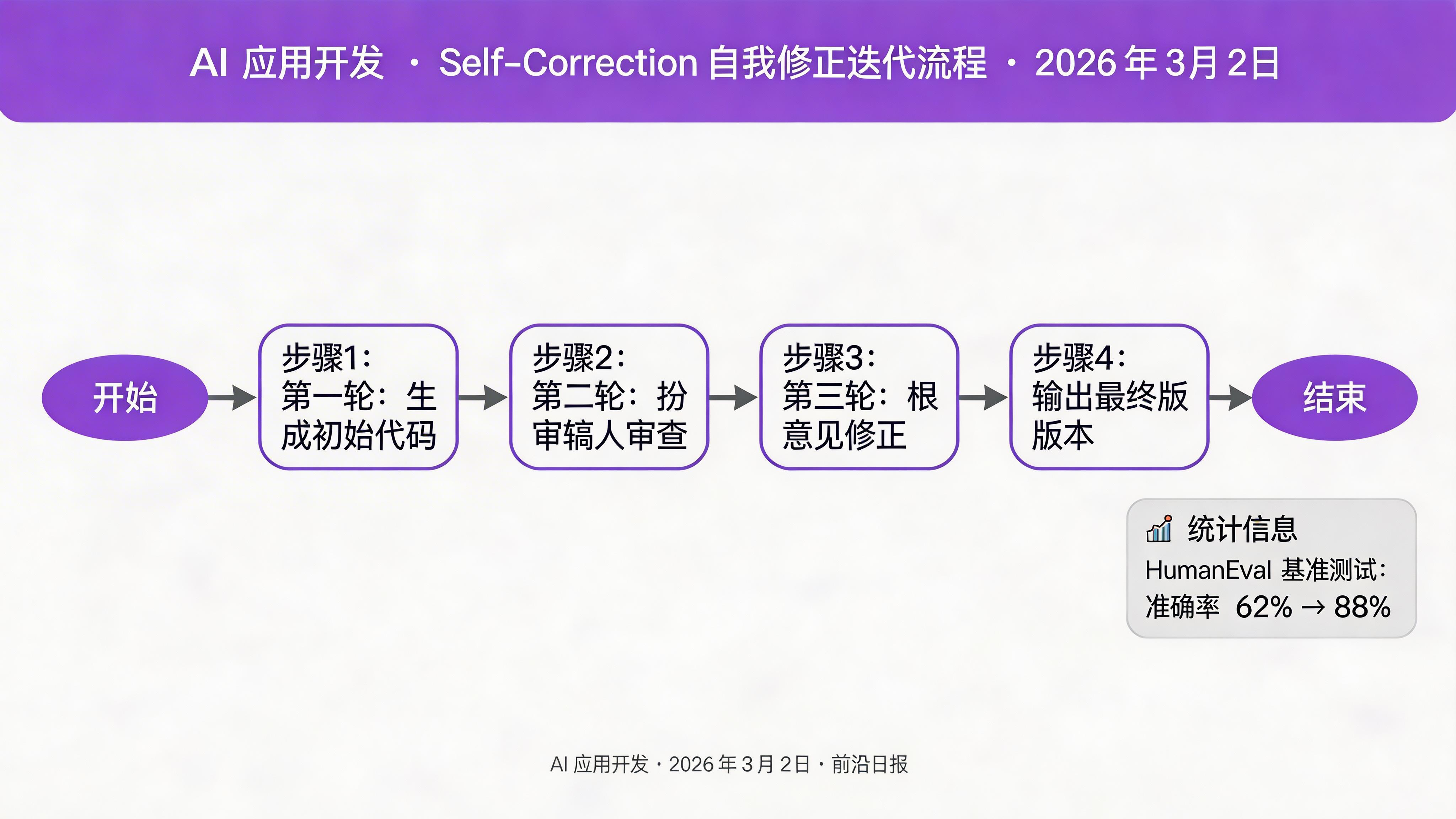
2026 年 HumanEval 基准测试显示,使用 Self-Correction 可将代码生成准确率从 62% 提升到 88%。
实现带自我修正的代码生成器
def generate_code_with_correction(task: str, model: str = "gpt-4o") -> dict:
    """生成代码并自我修正,返回最终代码和修正历史"""

    # 第一轮:生成初始代码
    gen_prompt = f"""请编写 Python 代码完成以下任务:
{task}

要求:
- 代码完整可运行
- 包含必要的注释
- 处理边界情况

```python"""

    response1 = client.chat.completions.create(
        model=model,
        messages=[{"role": "user", "content": gen_prompt}],
        temperature=0.7,
        max_tokens=1024
    )
    initial_code = response1.choices[0].message.content.strip('`\\n')

    # 第二轮:自我审查
    review_prompt = f"""请审查以下代码,找出可能的错误、边界情况未处理或可优化的地方:

```python
{initial_code}
```

请列出:
1. 发现的每个问题(如有)
2. 对应的修复建议
3. 如果代码完全正确,说明理由"""

    response2 = client.chat.completions.create(
        model=model,
        messages=[{"role": "user", "content": review_prompt}],
        temperature=0.3,
        max_tokens=1024
    )
    review = response2.choices[0].message.content

    # 第三轮:根据审查修正
    fix_prompt = f"""基于以下审查意见,修正代码:

原始代码:
```python
{initial_code}
```

审查意见:
{review}

如果审查认为代码正确,返回原代码。否则返回修正后的完整代码。

修正后的代码:
```python"""

    response3 = client.chat.completions.create(
        model=model,
        messages=[{"role": "user", "content": fix_prompt}],
        temperature=0.3,
        max_tokens=1024
    )
    final_code = response3.choices[0].message.content.strip('`\\n')

    return {
        "initial": initial_code,
        "review": review,
        "final": final_code
    }

# 测试:生成一个快速排序函数
result = generate_code_with_correction("实现快速排序,要求处理空列表和重复元素")
print("=== 最终代码 ===")
print(result["final"])关键洞察:Self-Correction 的核心是让模型扮演"作者"和"审稿人"两个角色。2026 年研究显示,明确告诉模型"请像严格的代码审查员一样检查"比泛泛地说"请检查错误"效果好 3 倍。
技巧三:Tree of Thoughts(思维树)
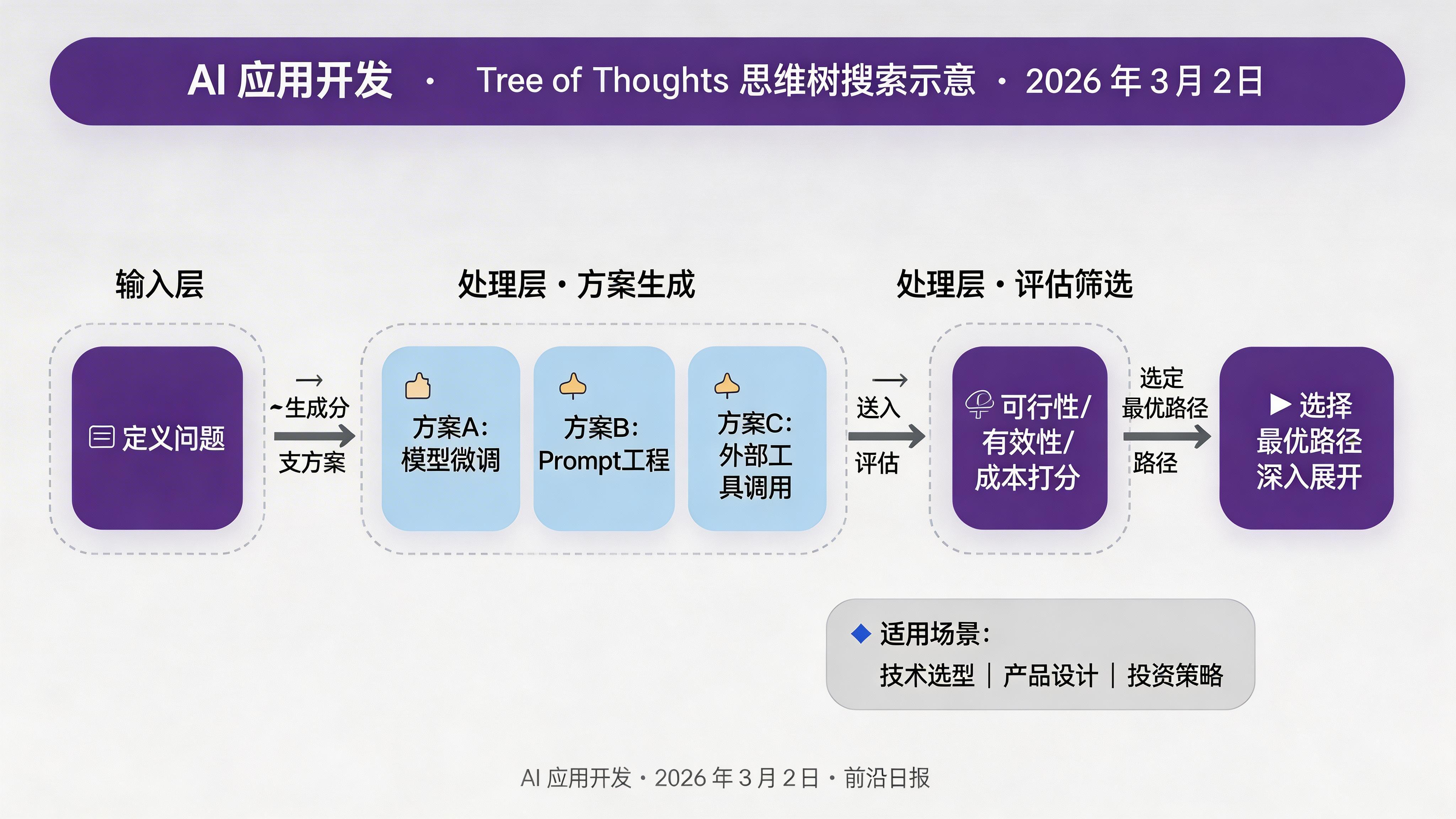
Tree of Thoughts(ToT)是 CoT 的升级版,适用于需要探索多种可能性并做出决策的复杂任务。核心流程:
- 生成多个可能的思考方向(分支)
- 评估每个方向的可行性
- 选择最优路径深入
- 如遇到死胡同,回溯到其他分支
实现简化版 Tree of Thoughts
完整 ToT 实现较复杂,这里展示一个实用简化版,适合规划和创意类任务:
def tree_of_thoughts(
    problem: str,
    num_branches: int = 3,
    max_depth: int = 2,
    model: str = "claude-sonnet-4-6"
) -> str:
    """
    简化版 Tree of Thoughts:生成多个方案并评估选择

    适用场景:产品规划、技术方案选型、创意写作大纲
    """
    from anthropic import Anthropic
    client = Anthropic()

    # Step 1: 生成多个思考方向
    branch_prompt = f"""问题:{problem}

请生成 {num_branches} 个不同的解决方案方向。
每个方向用 2-3 句话描述核心思路。

格式:
方案 1:[名称]
描述:...

方案 2:[名称]
描述:...

方案 3:[名称]
描述:..."""

    response = client.messages.create(
        model=model,
        max_tokens=1024,
        messages=[{"role": "user", "content": branch_prompt}]
    )
    branches = response.content[0].text

    # Step 2: 评估每个方案
    eval_prompt = f"""以下是针对问题"{problem}"的三个方案:

{branches}

请从以下维度评估每个方案(1-10 分):
1. 可行性:实施的难易程度
2. 有效性:解决问题的可能性
3. 成本:所需资源(分数高=成本低)

计算每个方案的综合得分,并推荐最优方案。

评估结果:"""

    response2 = client.messages.create(
        model=model,
        max_tokens=1024,
        messages=[{"role": "user", "content": eval_prompt}]
    )
    evaluation = response2.content[0].text

    # Step 3: 深入最优方案
    expand_prompt = f"""问题:{problem}

已选择的方案评估:
{evaluation}

请详细展开最优方案,包括:
1. 具体实施步骤(至少 5 步)
2. 每步的预期产出
3. 可能的风险和应对策略
4. 成功的关键指标

详细方案:"""

    response3 = client.messages.create(
        model=model,
        max_tokens=2048,
        messages=[{"role": "user", "content": expand_prompt}]
    )

    return f"=== 生成的方案 ===\n{branches}\n\n=== 评估结果 ===\n{evaluation}\n\n=== 最终方案 ===\n{response3.content[0].text}"

# 测试:技术方案选型
problem = "为一个日活 100 万的电商 APP 设计推荐系统架构,要求响应时间<200ms,支持实时用户行为反馈"
result = tree_of_thoughts(problem, num_branches=3)
print(result)
ToT 特别适合需要权衡取舍的决策场景,如技术选型、产品设计、投资策略等。
技巧四:ReAct++(推理 + 行动增强版)
ReAct(Reasoning + Acting)是 2023 年提出的经典范式,而 2026 年的 ReAct++ 进一步强化了工具调用和外部信息获取的能力。
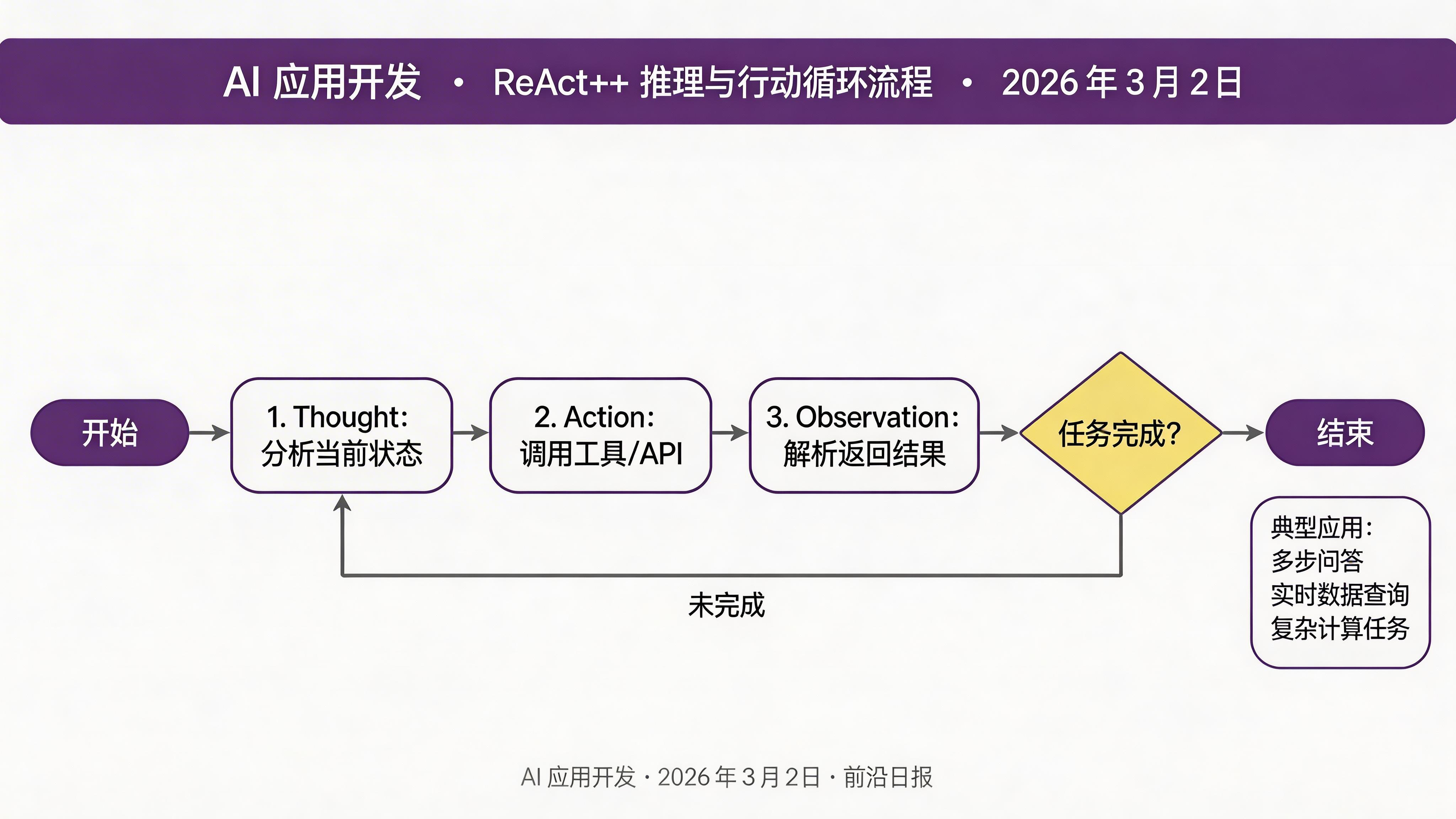
ReAct++ 的核心循环:
实现 ReAct++ 智能助手
import requests
from typing import Optional

# 定义可用工具
TOOLS = {
    "search": "搜索网络获取最新信息",
    "calculator": "执行数学计算",
    "current_date": "获取当前日期"
}

def use_tool(tool_name: str, query: str) -> str:
    """调用工具获取结果"""
    if tool_name == "calculator":
        # 简单实现,生产环境用 wolframalpha
        try:
            result = eval(query, {"__builtins__": {}}, {})
            return f"计算结果:{result}"
        except Exception as e:
            return f"计算错误:{e}"
    elif tool_name == "current_date":
        from datetime import datetime
        return f"当前日期:{datetime.now().strftime('%Y-%m-%d')}"
    elif tool_name == "search":
        # 模拟搜索,实际可接 SerpAPI 等
        return f"搜索结果(模拟): 关于'{query}'的最新信息显示..."
    else:
        return f"未知工具:{tool_name}"

REACT_PREFIX = """你是一个智能助手,可以使用工具来帮助用户。

可用工具:
{tools}

请按以下格式思考和行动:

Thought: 分析当前情况,决定下一步
Action: [工具名称] - [工具输入]
Observation: [工具返回结果]
... (重复 Thought/Action/Observation 直到有足够信息)
Thought: 我有足够信息来回答问题
Final Answer: [最终回答]

开始!"""

def react_agent(question: str, max_turns: int = 5) -> str:
    """ReAct++ 智能助手"""
    from openai import OpenAI
    client = OpenAI()

    tools_desc = "\n".join([f"- {k}: {v}" for k, v in TOOLS.items()])
    prefix = REACT_PREFIX.format(tools=tools_desc)

    messages = [
        {"role": "system", "content": prefix},
        {"role": "user", "content": f"问题:{question}"}
    ]

    for turn in range(max_turns):
        response = client.chat.completions.create(
            model="gpt-4o",
            messages=messages,
            temperature=0.2,
            max_tokens=512,
            stop=["Final Answer:"]
        )

        thought_action = response.choices[0].message.content
        messages.append({"role": "assistant", "content": thought_action})

        # 解析 Action
        if "Action:" in thought_action:
            action_line = thought_action.split("Action:")[1].split("\n")[0].strip()
            if " - " in action_line:
                tool_name, query = action_line.split(" - ", 1)
                tool_name = tool_name.strip()
                query = query.strip()

                # 调用工具
                observation = use_tool(tool_name, query)
                messages.append({"role": "user", "content": f"Observation: {observation}"})
                continue

        # 生成最终回答
        final_response = client.chat.completions.create(
            model="gpt-4o",
            messages=messages + [{"role": "user", "content": "请给出最终回答"}],
            temperature=0.3,
            max_tokens=512
        )
        return final_response.choices[0].message.content

    return "达到最大轮次,未能完成回答"

# 测试:需要多步工具调用
question = "今天是几号?如果距离 2026 年春节(2 月 17 日)还有多少天?"
result = react_agent(question)
print(result)注意:生产环境中应使用成熟的 Agent 框架(如 LangChain、LlamaIndex)来管理工具调用,上述代码仅用于演示 ReAct++ 的核心逻辑。
技巧五:Reflexion(反思学习)
Reflexion 是 2026 年最受关注的新兴技巧,灵感来自人类的从错误中学习能力。与 Self-Correction 不同,Reflexion 会记住历史错误,在后续任务中避免重蹈覆辙。
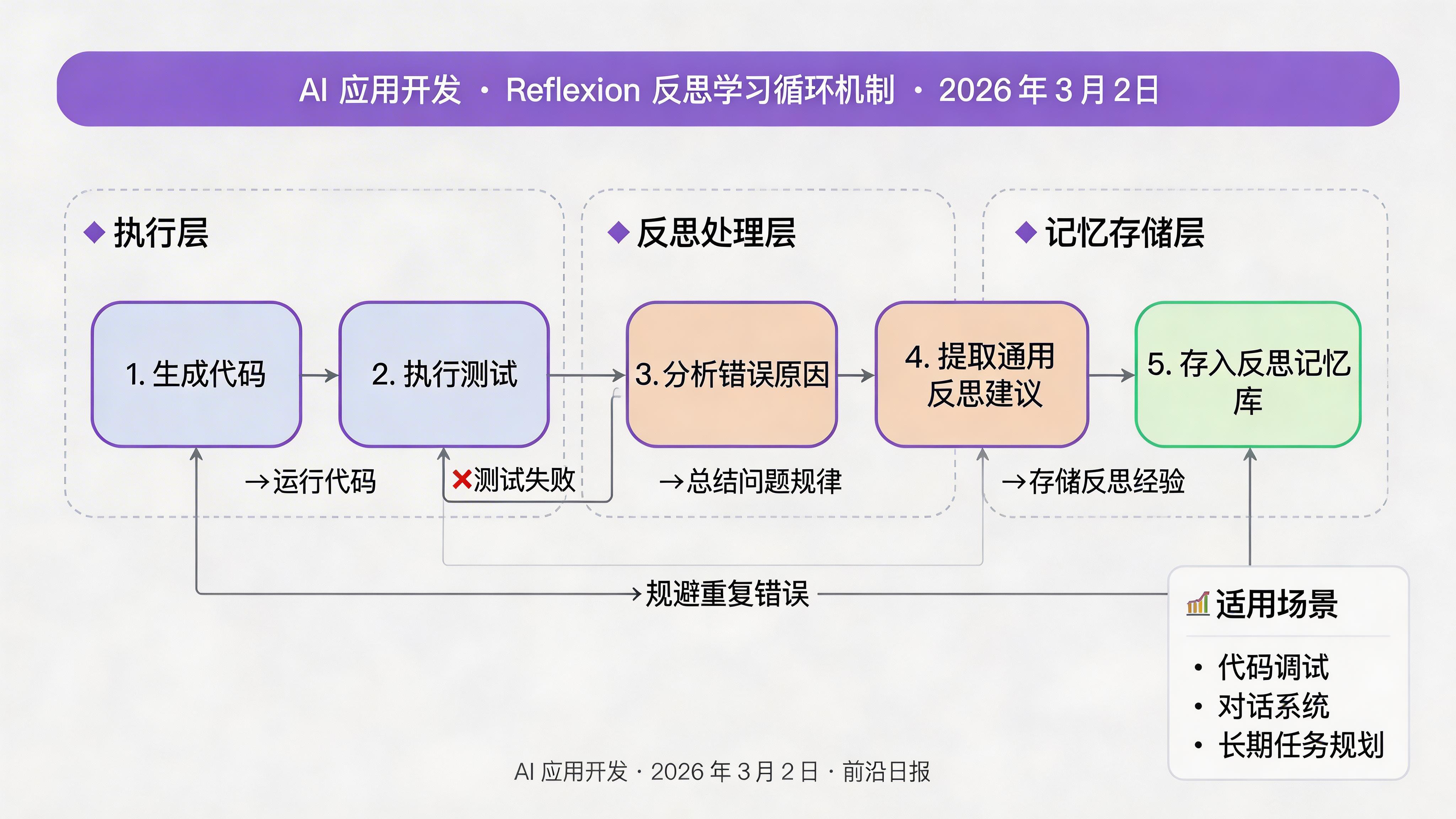
适用场景:
- 多轮对话系统(记住用户反馈)
- 代码调试迭代(记住历史错误)
- 长期任务规划(根据执行结果调整策略)
实现带反思学习的代码调试助手
class ReflexionCoder:
    """带反思学习能力的代码助手"""

    def __init__(self, model: str = "claude-sonnet-4-6"):
        from anthropic import Anthropic
        self.client = Anthropic()
        self.model = model
        self.memory = []  # 存储历史错误和反思

    def generate_and_reflect(self, task: str, max_attempts: int = 3) -> dict:
        """生成代码,执行,反思错误,迭代改进"""

        for attempt in range(1, max_attempts + 1):
            # 构建 Prompt(包含历史反思)
            memory_context = ""
            if self.memory:
                memory_context = "\n".join([
                    f"历史错误 {i+1}: {m['error']}\n反思:{m['reflection']}\n---"
                    for i, m in enumerate(self.memory[-3:])  # 最近 3 次
                ])

            gen_prompt = f"""请编写 Python 代码完成以下任务:
{task}

{memory_context if memory_context else ''}
{f"特别注意避免以上历史错误" if memory_context else ''}

```python"""

            # 生成代码
            response = self.client.messages.create(
                model=self.model,
                max_tokens=1024,
                messages=[{"role": "user", "content": gen_prompt}]
            )
            code = response.content[0].text.strip('`\\n')

            # 执行测试(沙箱环境,实际应用需隔离)
            result = self._safe_execute(code)

            if result["success"]:
                return {
                    "success": True,
                    "code": code,
                    "attempts": attempt,
                    "reflections": self.memory.copy()
                }

            # 反思错误
            reflect_prompt = f"""代码执行失败:

代码:
```python
{code}
```

错误信息:
{result["error"]}

请分析:
1. 错误原因是什么?
2. 如何避免类似错误?
3. 给出 1-2 条通用的编程建议(reflection)"""

            reflect_response = self.client.messages.create(
                model=self.model,
                max_tokens=512,
                messages=[{"role": "user", "content": reflect_prompt}]
            )
            reflection = reflect_response.content[0].text

            # 存储到记忆
            self.memory.append({
                "code": code,
                "error": result["error"],
                "reflection": reflection
            })

        return {
            "success": False,
            "code": code,
            "attempts": max_attempts,
            "reflections": self.memory.copy()
        }

    def _safe_execute(self, code: str) -> dict:
        """安全执行代码(简化版,生产环境用 Docker 沙箱)"""
        try:
            # 简单测试:检查语法
            compile(code, '', 'exec')
            # 实际应运行单元测试
            return {"success": True, "output": "语法正确"}
        except Exception as e:
            return {"success": False, "error": str(e)}

# 测试
coder = ReflexionCoder()
result = coder.generate_and_reflect(
    "写一个函数计算斐波那契数列第 n 项,n 从 1 开始"
)
print(f"尝试次数:{result['attempts']}")
print(f"反思记录:{len(result['reflections'])} 条")
常见问题 FAQ
总结与行动清单
- Chain of Thought:强制展示推理步骤,适合数学/逻辑题
- Self-Correction:自我审查修正,适合代码/证明等高精度场景
- Tree of Thoughts:多方案探索评估,适合规划/决策类任务
- ReAct++:推理 + 工具调用循环,适合需外部信息的复杂问题
- Reflexion:从历史错误中学习,适合多轮迭代和长期任务
下一步行动:选择 1-2 个技巧应用到你的当前项目中,建立评估指标,追踪效果。推荐从 CoT 开始(最简单,效果最稳定)。